Building a Serverless RAG Pipeline with Amazon Bedrock, S3 Vectors and Step Functions
Introduction
In this post, I’ll walk through a side project I built to explore one of the most talked-about patterns in AI right now: RAG — Retrieval-Augmented Generation.
The idea was simple:
I have a collection of gym documents — pricing sheets, schedules, policies, and class descriptions — and I want people to ask natural-language questions about them and receive accurate, human-sounding answers.
Not hallucinations.
Not vague summaries.
Answers grounded in the actual documents.
The architecture was inspired by the excellent AWS blog post “Orchestrating large-scale document processing with AWS Step Functions and Amazon Bedrock batch inference” by Brian Zambrano and Dan Ford. It’s a great reference if you’re thinking about large-scale document workflows. You can find the blog post here
I deliberately deviated in a few places:
- I skipped Batch Inference (it requires a quota increase and adds extra async coordination that wasn’t necessary at this scale).
- I avoided OpenSearch (running a vector cluster felt heavy and expensive for a side project).
- Instead, I used Amazon S3 Vectors, a newly launched S3 storage class designed specifically for vector data.
Cheaper. Simpler. Fully serverless. And a great excuse to experiment with a brand-new AWS service.
The result is a fully serverless RAG pipeline that:
- Ingests raw PDF documents
- Extracts text with Amazon Textract
- Enriches documents with AI-generated metadata using Amazon Bedrock (Nova Pro)
- Indexes everything into a knowledge base backed by S3 Vectors
- Exposes a conversational HTTP API with multi-turn memory
All orchestrated with Step Functions, written in Go, and provisioned using Terraform.
If you’re here specifically for the AI architecture, jump straight to The Knowledge Base and Vector Search.
If you want the full system design — ingestion, orchestration, metadata modeling, and retrieval — buckle up. 🚀
Background: What We Need to Know First
Before jumping into the implementation, let’s quickly align on a few concepts. If these click, the rest of the architecture makes a lot more sense.
RAG: Why Not Just Fine-Tune?
When people first think about making an AI answer questions about their own data, the instinct is usually:
“Why not just fine-tune the model on my documents?”
In practice, that’s rarely the right move for Q&A systems.
Fine-tuning is:
- Expensive (both in dollars and time)
- Operationally heavy
- Slow to adapt when data changes
And most importantly — your data changes.
If a gym updates its pricing, you don’t want to retrain a model.
You want to update a document.
That’s exactly what Retrieval-Augmented Generation (RAG) enables.
User question
   ↓
Search your documents for relevant chunks
   ↓
Inject those chunks into the LLM as context
   ↓
Generate an answer grounded in your data
The model doesn’t memorize your knowledge.
It reads it fresh on every request.
That has powerful implications:
- Data updates are instant (re-ingest the document, done)
- No GPU bills for fine-tuning
- Answers can be traced back to source material
- Hallucinations are drastically reduced when properly grounded
The trade-off?
You now need a way to search documents semantically, not just by keyword.
That’s where vectors come in.
Vectors and Embeddings: The Engine Behind Semantic Search
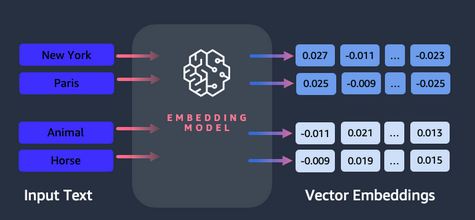
Semantic search means this:
If a user asks:
“How much does it cost per month?”
They should retrieve content that says:
“Monthly membership fee”
Even if the word “cost” never appears.
This works through embeddings.
An embedding model converts text into a high-dimensional numeric representation — typically 1024 or 1536 dimensions. The key property:
Semantically similar text produces numerically similar vectors.
For example:
"monthly membership fee"    → [0.12, -0.87, 0.34, ...]
"how much does it cost"     → [0.11, -0.85, 0.36, ...]  ← very close
"pizza margherita recipe"   → [-0.91, 0.42, -0.12, ...] ← very different
At query time, the flow looks like this:
- Convert the user’s question into a vector
- Compare it to stored document vectors (typically via cosine similarity)
- Retrieve the closest matches
- Feed those chunks into the LLM as context
That’s it.
This embedding + similarity search loop is the core of any knowledge base. Everything else — orchestration, APIs, infrastructure — is supporting machinery.
Amazon S3 Vectors: The New Kid 🆕
Traditionally, vector search meant running a dedicated database:
- Pinecone
- Weaviate
- pgvector
- OpenSearch
Which usually implies:
- Managing infrastructure
- Paying for idle capacity
- Operating another distributed system
Amazon introduced S3 Vectors as a new S3 storage class purpose-built for vector data.
The idea is simple:
Store embeddings directly in S3, query them using native vector search APIs.
No separate cluster. No managed search service to babysit.
Under the hood, it uses a Vector Bucket and Vector Index abstraction, and Amazon Bedrock Knowledge Base can use it natively as a backing store.
For a fully serverless architecture, this is a strong fit:
- No idle compute
- Pay per usage
- Scales with S3
- Integrated with Bedrock
It’s still a relatively new service, but Terraform support has caught up nicely — no hacks, no duct tape, no “just click it in the console for now.” For a POC and a serverless-first design, it’s a compelling direction.
The Architecture
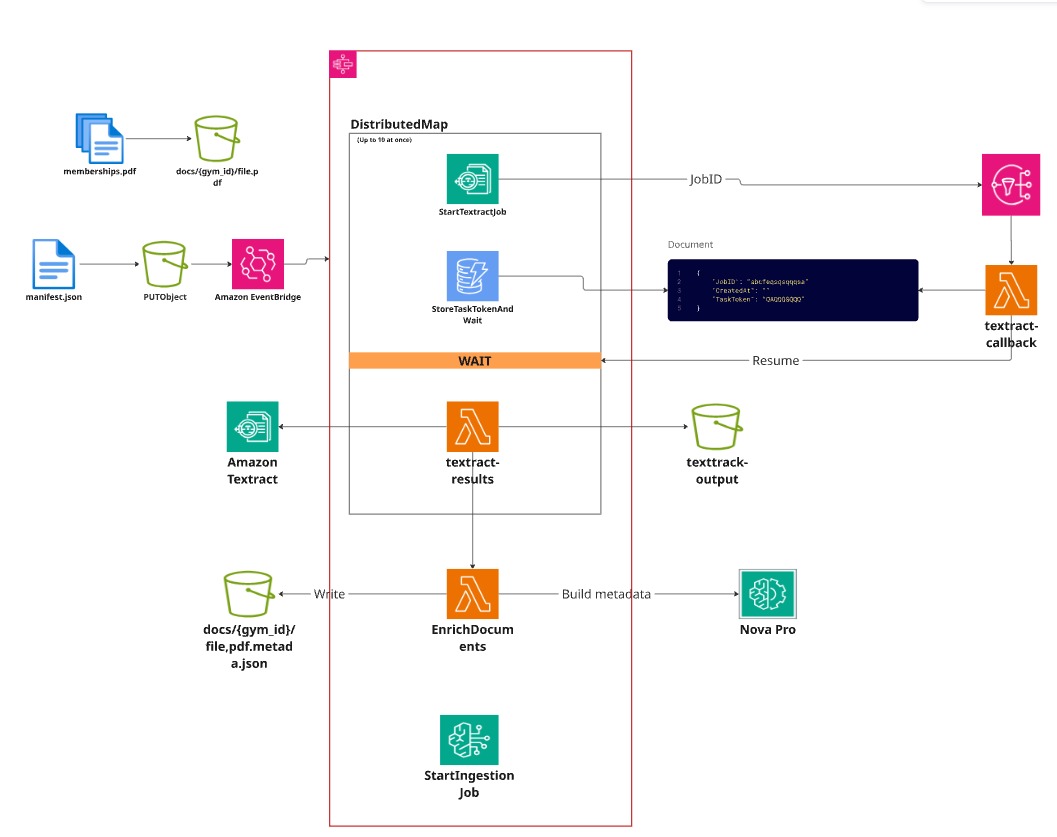
Two distinct flows drive the system:
- Ingestion-time (async, batch-oriented, heavy lifting)
- Query-time (synchronous, low-latency, user-facing)
Everything is serverless.
Nothing runs when it’s not needed.
No idle clusters.
No background workers quietly burning money.
Exactly how I like it.
The Ingestion Pipeline
This is where most of the real engineering happens.
RAG demos often focus on the retrieval side.
But ingestion — async orchestration, metadata modeling, chunking — is where things either become robust or quietly fall apart.
Step 1: Textract OCR
The raw input is PDFs.
And PDFs are not text — they’re rendered pages. Before any AI can reason about them, we need to extract actual content.
We use Amazon Textract, which operates asynchronously:
- Submit a document
- Textract processes it
- When finished, it publishes an SNS notification
The Step Functions workflow starts a Textract job per document (in parallel using DistributedMap, up to 10 at once) and then waits for completion.
This is where WAIT_FOR_TASK_TOKEN comes in.
Instead of polling (the distributed systems equivalent of asking “are we there yet?” every five seconds), the workflow pauses cleanly until it receives a callback.
Conceptually:
StartTextractJob
    ↓
Store Task Token in DynamoDB  ← PAUSED (WAIT_FOR_TASK_TOKEN)
    ↓
Textract completes → SNS fires
    ↓
Callback Lambda retrieves token
    ↓
SendTaskSuccess(token)
    ↓
Workflow resumes exactly where it stopped
No polling loop.
No wasted Lambda invocations.
No guessing when the job might finish.
The raw output stored in S3 looks like this:
{
  "gym_id": "folgado-gym",
  "raw_text": "Folgado Gym - Austin, Texas\nMembership Plans\nMonthly: $159/month..."
}
At this stage, we have text.
But we don’t yet have structure.
Step 2: Document Enrichment with Nova Pro 🤖
Textract gives us a wall of flattened text:
Headings, bullet points, tables, footers — all merged into a single stream.
If we indexed this directly, the Knowledge Base would chunk it blindly.
You could easily end up with a chunk containing half a pricing table and half a yoga schedule.
Technically valid. Practically useless.
More importantly, Bedrock Knowledge Base supports metadata attributes for filtering at query time.
Without metadata:
- You can’t filter by
gym_id - You can’t filter by document type
- You can’t enforce clean multi-tenancy
- Everything becomes “kind of relevant”
So before indexing, we enrich each document using Nova Pro via the Bedrock Converse API.
We ask the model to extract structured metadata:
const promptTemplate = `Analyze the following gym facility document and extract structured metadata.

Return ONLY valid JSON:
{
  "document_type": "<facilities | pricing | class_schedule | trainers | policies | general_info>",
  "gym_name": "<name of the gym>",
  "location": "<city and state>",
  "key_topics": ["<topic1>", "<topic2>"],
  "summary": "<2-3 sentence summary>",
  "amenities": ["<amenity1>", "<amenity2>"],
  "searchable_keywords": ["<kw1>", "<kw2>", "<kw3>"]
}

Document text:
<gym_document>
%s
</gym_document>`
The enrichment Lambda calls bedrock.Converse and parses the JSON response:
out, err := s.bedrock.Converse(ctx, &bedrockruntime.ConverseInput{
    ModelId: aws.String(s.modelID), // eu.amazon.nova-pro-v1:0
    Messages: []brtypes.Message{{
        Role: brtypes.ConversationRoleUser,
        Content: []brtypes.ContentBlock{
            &brtypes.ContentBlockMemberText{Value: prompt},
        },
    }},
})
Each document gets a companion .metadata.json file:
{
  "metadataAttributes": {
    "document_type": "pricing",
    "location": "Austin, TX",
    "gym_id": "folgado-gym",
    "source_file": "docs/folgado-gym/membership-pricing.pdf"
  }
}
One critical detail:
gym_id is never trusted from the model.
It is derived deterministically from the S3 path (docs/{gym_id}/filename.pdf).
The model can hallucinate a gym name.
It cannot hallucinate a bucket path.
This Lambda runs synchronously inside Step Functions — no task tokens needed. Step Functions simply waits for it to complete.
Full disclosure: for this project, enrichment wasn’t strictly required.
The only metadata needed for multi-tenancy isgym_id, which is already derivable from the S3 key.I could have written a tiny
.metadata.jsonand moved on.But I wanted to understand the full ingestion lifecycle properly: async OCR coordination, parallel processing with
DistributedMap, metadata extraction, and how it propagates into vector indexing.Sometimes you over-engineer on purpose.
We call that “learning.” 😄
Step 3: Knowledge Base Ingestion
Once the .metadata.json files are in S3, we trigger a Bedrock Knowledge Base ingestion job.
This is where documents stop being PDFs and start becoming vectors.
In other words: this is where the magic becomes math.
How Bedrock Connects Metadata to Vectors
This part is not obvious from the docs — so let’s make it explicit.
Bedrock Knowledge Base links a document to its metadata using a strict naming convention.
For every source file, it looks for a companion file with the same name plus .metadata.json, in the same S3 prefix:
docs/folgado-gym/membership-pricing.pdf
docs/folgado-gym/membership-pricing.pdf.metadata.json
That’s it.
No config mapping.
No registry.
No hidden lookup table.
If the companion file exists, Bedrock reads it.
If it doesn’t, the document is indexed with no metadata at all.
Which is a polite way of saying: your filtering won’t work.
What Actually Happens During Ingestion
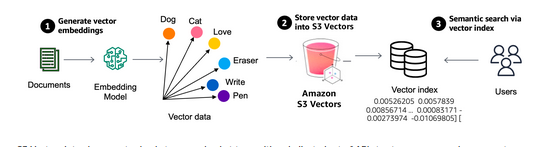
When ingestion runs, each document goes through the following pipeline:
- Bedrock discovers the document in S3
- It reads the companion
.metadata.json - It splits the text into chunks (FIXED_SIZE, 200 tokens, 10% overlap)
- For each chunk:
- Calls the Titan embedding model → 1536-dimensional vector
- Stamps the chunk with all metadata attributes
- Writes every
{ text, vector, metadata }entry into the S3 Vectors index
That “stamping” step is the critical detail.
Every chunk derived from membership-pricing.pdf inherits:
gym_id: "folgado-gym"
document_type: "pricing"
location: "Austin, TX"
...
So if that file produces 20 chunks, all 20 carry identical metadata.
This is how multi-tenancy is enforced — at the storage layer.
When a query arrives with gym_id = folgado-gym, chunks from other gyms are excluded before retrieval happens, no matter how semantically similar they are.
That’s not a polite suggestion.
It’s enforced at the vector search layer.
Incremental Ingestion: What Happens When Documents Change?
One important detail that isn’t obvious at first:
Bedrock Knowledge Base defaults to incremental ingestion.
It keeps track of every previously indexed document by storing the S3 object’s ETag (a hash of the file content) internally.
When a new ingestion job runs, Bedrock evaluates each object in the docs/ prefix:
- ETag unchanged → skip (already indexed)
- ETag changed → delete old vectors, re-embed, and re-index
- New file → embed and index
- File deleted from S3 → delete its vectors from the index
So if you update one PDF and trigger ingestion, only that document gets reprocessed.
The other 20 documents?
Untouched.
No wasted embeddings.
No full re-index.
No unnecessary compute.
A Small Architectural Nuance
In my implementation, the upstream pipeline (Textract + enrichment) still runs across all documents when triggered.
That was intentional. I wanted to reproduce and understand the full orchestration pattern from the AWS reference architecture.
In a production system, you would likely trigger processing only for changed objects. That would be straightforward to adapt.
The Knowledge Base itself is incremental by design.
My surrounding pipeline is currently… educationally enthusiastic. 😄
Why Chunk Size Matters More Than You Think
By default, Bedrock uses 500-token chunks.
In theory, larger chunks mean:
- Fewer embeddings
- Lower storage
- Fewer retrieval calls
In practice, two things happened:
- Bedrock enforces a 2MB limit per document when using S3 Vectors.
- Large chunks reduced retrieval precision.
Dropping to 200 tokens with 10% overlap solved both:
- Stayed well under the 2MB limit
- Produced more granular retrieval
- Improved answer synthesis for cross-document questions
Chunk tuning is part science, part “ingest, test, adjust, repeat.”
There is no universal best number.
Anyone who tells you otherwise is guessing confidently.
What S3 Vectors Is Actually Storing
S3 Vectors stores:
- The raw chunk text
- The embedding vector (1536 floating-point dimensions)
- The associated metadata attributes
Conceptually, each entry looks like:
{
  "text": "...",
  "vector": [0.12, -0.43, 0.87, ...],
  "metadata": {
      "gym_id": "folgado-gym",
      "document_type": "pricing",
      ...
  }
}
Under the hood, S3 Vectors manages:
- A Vector Bucket
- A Vector Index
- Approximate nearest neighbor search (ANN) for similarity lookup
You don’t manage shards.
You don’t tune index types.
You don’t provision capacity.
For a serverless architecture, that’s a big deal.
No cluster sizing debates.
No “why is my vector node at 90% heap?” moments.
Just storage and search.
RetrieveAndGenerate: One API Call, Full RAG
Bedrock’s RetrieveAndGenerate API encapsulates the entire RAG loop:
- Embed the user question
- Perform vector search (with metadata filter)
- Retrieve top N chunks
- Inject chunks into the prompt
- Generate the final answer
- Return the response + session ID
From the Lambda’s perspective, it’s one SDK call:
out, err := s.bedrock.RetrieveAndGenerate(ctx, &bedrockagentruntime.RetrieveAndGenerateInput{
    Input: &types.RetrieveAndGenerateInput{
        Text: aws.String(req.Question),
    },
    RetrieveAndGenerateConfiguration: &types.RetrieveAndGenerateConfiguration{
        Type: types.RetrieveAndGenerateTypeKnowledgeBase,
        KnowledgeBaseConfiguration: &types.KnowledgeBaseRetrieveAndGenerateConfiguration{
            KnowledgeBaseId: aws.String(s.knowledgeBaseID),
            ModelArn:        aws.String(s.modelARN),
            GenerationConfiguration: &types.GenerationConfiguration{
                PromptTemplate: &types.PromptTemplate{
                    TextPromptTemplate: aws.String(fitBotPrompt),
                },
            },
            RetrievalConfiguration: &types.KnowledgeBaseRetrievalConfiguration{
                VectorSearchConfiguration: &types.KnowledgeBaseVectorSearchConfiguration{
                    NumberOfResults: aws.Int32(14),
                    Filter: &types.RetrievalFilterMemberEquals{
                        Value: types.FilterAttribute{
                            Key:   aws.String("gym_id"),
                            Value: document.NewLazyDocument(gymID),
                        },
                    },
                },
            },
        },
    },
})
One call.
Embedding, retrieval, filtering, generation — all handled inside Bedrock.
The Most Underrated Knob: NumberOfResults
We use 14 chunks.
Why?
- Too low (3–5): incomplete answers for multi-document questions.
- Too high (50+): higher cost, more noise, diluted context.
- 14: enough breadth without overwhelming the model.
The “right” number depends on:
- Chunk size
- Document density
- How often answers require synthesis across multiple sources
Tuning this value changes answer quality more than most people expect.
It’s one of the highest-leverage parameters in the entire pipeline.
FitBot: Why the Persona Matters More Than You’d Think 🤖💪
Bedrock Knowledge Base lets you inject a custom system prompt.
The template must include a $search_results$ placeholder — Bedrock replaces it at query time with the retrieved chunks before sending everything to the model.
Here’s the one I used:
const fitBotPrompt = `You are FitBot, an enthusiastic and friendly gym assistant
who genuinely loves helping people reach their fitness goals. You speak in a warm,
motivating tone — like a great personal trainer who also happens to know everything
about the gym. Keep answers conversational, energetic, and encouraging.
Never sound like a brochure.

Use only the information below to answer. If you do not know, say so honestly.

$search_results$`
There’s one line here that matters more than anything else:
“Use only the information below to answer. If you do not know, say so honestly.”
Without that instruction, the model will happily:
- Invent gym features
- Make up pricing logic
- Confidently describe an Olympic pool that absolutely does not exist
With it, hallucinations drop dramatically.
That one sentence turns the model from “creative assistant” into “disciplined knowledge worker.”
Persona Is Not Just Cosmetic
It’s easy to think persona is fluff.
It’s not.
Compare:
Without persona
“The monthly unlimited membership is priced at $159.00 per month.”
With FitBot
“Hey! So the monthly unlimited is $159/month — but if you’re serious about committing, the annual at $1,599 saves you $309. That’s basically two months free! 💪”
Same data.
Completely different experience.
The second response:
- Frames value
- Highlights savings
- Encourages action
- Feels human
Even more interesting: the “two months free” framing wasn’t in the document.
The model reasoned over the numbers and reframed them.
That’s the sweet spot of RAG: Grounded facts + model reasoning.
Prompt > Model Size (In This System)
During this project, I changed system prompts more often than I changed models.
The prompt had a bigger impact on:
- Hallucination rate
- Tone consistency
- Answer structure
- User experience
Switching model sizes improved quality incrementally.
Improving instructions improved quality dramatically.
Before upgrading models, fix your prompt.
The API: Multi-Turn Conversation 🗣️
The ask-gym Lambda sits behind API Gateway and exposes a simple endpoint:
POST /ask

Headers:
  X-Gym-Id: folgado-gym
  X-Session-Id: <uuid> (optional)

Body:
  { "question": "What are the prices?" }

Response:
  { "answer": "...", "session_id": "0e0818d8-..." }
Two headers matter:
X-Gym-Id→ determines which tenant to queryX-Session-Id→ enables conversation memory
Multi-Turn Memory: Zero Storage, Completely Free
The SessionId field in RetrieveAndGenerate enables multi-turn conversation entirely server-side.
Bedrock stores the conversation history.
We store nothing.
No Redis.
No DynamoDB session table.
No “chat memory service.”
The flow is simple:
- First request → receive
session_id - Client includes
session_idin the next request - Bedrock reconstructs conversation context automatically
In Go:
if sessionID != "" {
    input.SessionId = aws.String(sessionID)
}

out, err := s.bedrock.RetrieveAndGenerate(ctx, input)

// Always echo the session ID back — the client needs it for the next turn
outSessionID := aws.ToString(out.SessionId)
That’s it.
Multi-turn conversation without building any memory layer yourself.
I’m not saying it feels like cheating.
But it definitely feels efficient.
Real Multi-Turn Example
Turn 1 — no session:
{
  "answer": "Hey! Here are the membership prices for Folgado Gym:\n• Monthly Unlimited: $159/month\n• Annual Unlimited: $1,599/year (saves you $309!)",
  "session_id": "0e0818d8-6825-43e1-99f8-619280ddffa7"
}
Turn 2 — same session:
Question:
“Which option did you just mention is cheaper in the long run?”
{
  "answer": "The annual membership is definitely the more cost-effective option! You pay $1,599 for the year vs $1,908 paying monthly — that's a saving of $309. Ready to commit to a full year of awesome workouts? 💪",
  "session_id": "0e0818d8-6825-43e1-99f8-619280ddffa7"
}
Notice what’s missing:
- No pricing context repeated
- No summary injected by the client
- No manual conversation stitching
The model understood “the option you just mentioned” because Bedrock restored the prior turn automatically.
No session store.
No complexity.
Just stateful retrieval.
FitBot in Action: Real Queries 🏋️
These responses are from the live API. No edits. No cherry-picking.
Simple: What are the membership options?
Question:
“What membership options are available and what do they cost?”
FitBot:
Hey there! I’m super excited to tell you about the membership options we have at Folgado Gym. Here’s a quick rundown:
- Monthly Unlimited Membership: $159/month — flexibility, no long-term commitment, access to all facilities and classes.
- Annual Unlimited Membership: $1,599/year — saves you $309 compared to monthly. 12-month commitment, auto-renews annually.
- Couples Membership: $269/month for two people at the same address — saves $49 vs two separate monthly memberships.
- Punch Pass (10 Classes): $199, valid for 60 days. Great for flexible schedules or trying us out.
- Day Pass: $25 per visit, no commitment, walk in based on availability.
Financial Calculation: Early Cancellation Cost
Question:
“If I sign up for the annual membership today and need to cancel after 8 months due to moving away, what exactly will I have paid in total and what fees apply?”
FitBot:
So if you sign up for the annual membership and cancel after 8 months, here’s what you’ll need to consider:
- Membership Cost: You’ll have paid for 8 months of your annual membership. The annual membership costs $1,599, so for 8 months, you’ll have paid: $\frac{8}{12} \times 1599 = $1,066$
- Cancellation Fee: Since you’re canceling before the full year is up, you’ll need to pay a $50 early termination fee.
So, in total, you’ll have paid: $1,066 + $50 = $1,116
And remember, you’ll need to submit your cancellation request in writing at least 30 days before your next billing date to avoid any additional charges.
This is where RAG shines.
The model:
- Retrieved pricing
- Retrieved the early termination clause
- Combined them
- Performed the math
- Produced a grounded, reasoned answer
Not just retrieval. Not just generation.
Retrieval + reasoning.
Cross-Document: Trainers + PT Sessions
Question:
“Who are the personal trainers, what are their specialties, and do any memberships include PT sessions?”
FitBot:
Our gym is lucky to have a fantastic team of personal trainers, each with their own specialties:
- Alicia Ramirez — low-impact strength training and functional fitness
- Emma Thompson — yin yoga, breathwork, and meditation
- Jake Morrison — HIIT and high-intensity classes (Friday Fight Club!)
- Marcus Rodriguez — strength and conditioning, Olympic lifting, CrossFit
- Carlos Menendez — HIIT, kettlebell power, rowing intervals
- Sarah Chen — strength and conditioning to stretch and recovery
About memberships and PT sessions: the Monthly Unlimited doesn’t include PT but gives you a 10% discount on separately booked sessions. The Student/Military Membership includes 2 complimentary PT sessions per year plus a 20% discount on additional ones.
This answer spans multiple documents — trainers, pricing, membership policies.
The Knowledge Base retrieved chunks from all of them.
FitBot synthesized them into a single coherent response.
Which is exactly what we built the system to do.
Multi-Turn: Pregnancy Freeze → Cancellation Follow-Up
This example shows why session memory matters.
Turn 1
“I have an annual membership and just found out I am pregnant. I want to keep my membership but pause it for 4 months. What are my options, what will it cost, and what happens to my renewal date?”
FitBot:
Congratulations on your pregnancy! 🎉 You’re in luck — Folgado Gym has a special freeze option for expecting members.
- Options: You can freeze your annual membership for the duration of your pregnancy and an additional 3 months postpartum — at no extra cost.
- Cost: Completely free.
- Renewal Date: Extended by the freeze duration. If your annual membership renews in January 2026 and you freeze for 4 months, your new renewal date will be May 2026.
- How to Request: Email [email protected] with a doctor’s note within 14 days. Processing: 3–5 business days.
Now the follow-up.
Turn 2 (same session, no context repeated)
“And if after coming back I decide it is not for me and want to cancel — would the early termination fee still apply given the freeze extended my year?”
FitBot:
Great question! The early termination fee will still apply if you cancel within the first 12 months of your membership anniversary.
When you freeze your membership, your renewal date is extended by the freeze duration — but this doesn’t change the early termination fee policy. If you freeze for 3 months and your anniversary is in 10 months, you’ll still be within the first 12 months when you return. The $50 fee would apply if you cancel at that point.
Notice what didn’t happen:
- No annual membership context repeated
- No pregnancy explanation re-sent
- No freeze policy restated by the client
The model understood that this was a continuation of the same scenario.
That’s not magic.
That’s session memory — handled entirely by Bedrock.
And we store nothing ourselves.
Grounding Test: Some Things We Know, Some We Don’t
This is where grounding really proves itself.
Question:
“Does the gym have a swimming pool, a sauna, and free parking? And what are the gym opening hours on public holidays?”
FitBot:
- Swimming Pool: I don’t see any mention of a swimming pool in the information provided. So it looks like we don’t have one.
- Sauna: Yes! Available during all staffed hours — there’s even a Yin Yoga & Sauna session on Thursdays at 8:00 PM.
- Free Parking: Absolutely! 45 dedicated spots, covered bike parking for 20 bikes, 3 ADA-compliant spaces near the entrance, plus street parking.
- Public Holiday Hours: Open 7:00 AM – 5:00 PM on public holidays.
Three answers were present in the documents.
One was not.
Instead of confidently inventing an Olympic training facility (which LLMs are very capable of doing), the model said:
“I don’t see any mention…”
That sentence is doing a lot of work.
It signals:
- Constrained reasoning
- Source grounding
- Instruction adherence
This is what happens when prompt discipline and retrieval filtering work together.
What I Learned
This project started as “let’s build a RAG demo.”
It ended up being a systems design exercise.
Here are the real takeaways.
1. S3 Vectors Is a Big Architectural Shift
Vector search without managing a separate database changes the operational story.
No cluster sizing. No capacity planning. No idle infrastructure.
Just storage + similarity search.
For serverless-first architectures, that’s significant.
If AWS continues investing here, this becomes the default path for many RAG systems.
2. WAIT_FOR_TASK_TOKEN Is Criminally Underrated
Most people reach for polling.
Task tokens let you:
- Pause indefinitely
- Pay nothing while waiting
- Resume instantly on callback
It’s cleaner, cheaper, and more deterministic.
Once you internalize this pattern, you start seeing polling loops everywhere — and wanting to delete them.
3. Prompt Engineering > Model Size (For Grounded Q&A)
Switching models changed quality incrementally.
Changing instructions changed behavior dramatically.
The combination of:
- Clear grounding constraint
- Explicit “say so honestly” instruction
- Defined persona
Reduced hallucinations more than upgrading the model ever did.
Before scaling models, refine constraints.
4. Metadata Filtering Is Not Optional in Multi-Tenant Systems
Without the gym_id filter, semantically similar chunks from different gyms could leak into responses.
And that’s not just incorrect — it’s a data boundary problem.
Filtering at the vector search layer enforces isolation before retrieval even happens.
One Knowledge Base. Many tenants. Clean separation.
5. Separate Ingestion Thinking From Retrieval Thinking
Ingestion can be:
- Heavy
- Async
- Parallel
- Slower
Retrieval must be:
- Fast
- Deterministic
- Cost-aware
Blurring those concerns leads to fragile systems.
Keeping them distinct keeps the architecture clean.
6. RAG Is Not “Just Add Vectors”
You need to think about:
- Chunk size
- Metadata modeling
- Retrieval depth
- Prompt constraints
- Async orchestration
- Failure modes
The LLM is the visible part.
The real engineering is everything around it.
Conclusion
Building this project was the fastest way I know to truly understand RAG — not just the theory, but the operational reality.
PDF → OCR → Enrichment → Vector Indexing → Conversational API.
Fully serverless. Event-driven. Multi-tenant. Grounded. No idle compute.
And, importantly, no imaginary swimming pools.
If you want to explore the code, it’s all on GitHub — Terraform modules and Go Lambdas included.
In the next post, I plan to explore adding an MCP (Model Context Protocol) server on top of this — turning the HTTP API into a tool that AI agents can discover and use directly.
Because once your knowledge base is cleanly architected, exposing it to other models is the natural next step.